In the digital age, images play a critical role in how we communicate and share information online. With various formats available, understanding the benefits of each can help you optimize your content effectively. One of the most common conversions needed today is from WEBP to JPG. If you’re looking for a solution to convert your images seamlessly, Creatoolz provides an easy-to-use platform that caters to all your image conversion needs. In this article, we will explore the benefits of the WEBP format, the advantages of converting to JPG, and how to use Creatoolz to accomplish this task effortlessly.
Understanding Image Formats
What is WEBP?
WEBP is an image format developed by Google designed specifically for the web. It provides superior compression techniques, allowing images to be smaller in size without compromising quality. WEBP supports both lossy and lossless compression as well as transparency, which can reduce loading times on websites, benefiting both user experience and SEO.
The Benefits of Using WEBP
- Smaller File Sizes: WEBP images typically require less storage space compared to other formats like JPG or PNG. This is particularly useful for web developers looking to improve site performance.
- Improved Load Times: With smaller image files, web pages load faster, significantly enhancing user experience and retention rates.
- Quality Retention: WEBP compresses images with little to no noticeable loss in quality, making it an excellent choice for photographic images.
Why Convert WEBP to JPG?
Despite its advantages, there are situations where converting WEBP to JPG is necessary:
- Broader Compatibility: JPG is one of the most universally supported formats across different devices and applications. Some software may not support WEBP, making JPG the safer option for compatibility.
- Editing Flexibility: If you’re working with image editing software that primarily supports JPG, converting your WEBP images enables seamless integration into your projects.
- Simple Sharing: When sharing images with friends, family, or colleagues, JPG’s widespread acceptance means that recipients are less likely to encounter issues when opening or viewing the images.
How to Convert WEBP to JPG with Creatoolz
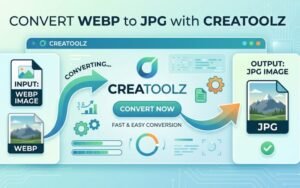
Using Creatoolz for your image conversion needs is straightforward and efficient. Here’s a step-by-step guide to help you easily transform your WEBP images into JPG format.
Step 1: Visit the Creatoolz Website
Navigate to the Creatoolz WEBP to JPG Converter. The interface is user-friendly, making the conversion process remarkably simple.
Step 2: Upload Your WEBP Files
You’ll see an area to upload your images. You can either drag and drop your WEBP files directly onto the page or click the “Choose Files” button to select images from your device.
Step 3: Start the Conversion
After uploading your files, click on the “Convert to JPG” button. Creatoolz processes your requests quickly, ensuring that your images are converted with minimal delay.
Step 4: Download Your JPG Images
Once the conversion is complete, you’ll receive a prompt to download your newly converted JPG images. Click the download link, and your high-quality JPG files will be saved to your device.
Benefits of Using Creatoolz for WEBP to JPG Conversion
1. Free to Use
Creatoolz provides an excellent service at no cost, making it accessible to anyone needing image conversion. This is particularly beneficial for students, freelancers, and small businesses looking to save on expenses.
2. No Registration Required
You can start converting images immediately without the hassle of signing up for an account. This convenience saves you time and allows for a quick, straightforward experience.
3.High-Quality Output
When converting using Creatoolz, you can expect high-quality results. The platform ensures that the converted JPG images maintain excellent resolution and clarity without degrading quality.
4. Fast Processing Speeds
In a fast-paced world, time is essential. Creatoolz excels in providing speedy processing times, allowing you to get your converted images within seconds.
5. User-Friendly Interface
The interface of Creatoolz is designed for users of all technical backgrounds. Navigate easily through the site, making the process accessible even for those unfamiliar with image conversion processes.
6. Secure and Private
Your privacy is paramount. Creatoolz ensures that uploaded files are not stored on their server after conversion, meaning your images remain confidential and secure.
Use Cases for WEBP to JPG Conversion
1. Web Developers
Web developers often work with images for websites and applications. Converting WEBP to JPG ensures that images are compatible across various platforms and devices, enhancing user experience.
2. Graphic Designers
Graphic designers frequently use image editing software that may not support WEBP. Converting WEBP images to JPG allows for seamless integration into design projects while maintaining quality.
3. Content Creators
For bloggers and social media managers, utilizing JPG images can help improve engagement rates. Converting WEBP images to JPG allows content creators to share images easily across different platforms.
4. E-Commerce Stores
E-commerce businesses benefit from faster loading times and high-quality images. Converting product images to JPG ensures compatibility across different customer devices and platforms.
5. Personal Use
Whether you want to share photos with friends or prepare images for a presentation, converting images to a more universally accepted format like JPG can help facilitate sharing and usability.
Conclusion
Converting WEBP to JPG is essential for many users looking to optimize their digital content. With Creatoolz, the process is simple, efficient, and entirely free. Whether you’re a web developer, graphic designer, or simply someone needing to convert images for personal use, Creatoolz offers the perfect solution for all your image conversion needs.
Why wait? Visit the Creatoolz WEBP to JPG Converter today and experience effortless image conversion that meets your needs! Transform your images while maintaining quality and compatibility with ease.
Frequently Asked Questions (FAQs)
What is the difference between WEBP and JPG?
WEBP is a modern image format that supports better compression (often smaller files) and can include transparency and animation; JPG is an older, widely supported lossy format best suited for photographs and broad compatibility.
Will converting WEBP to JPG reduce image quality?
Yes — converting WEBP to JPG typically uses lossy compression, which can reduce quality slightly. Choosing a higher JPG quality setting during conversion helps preserve visual detail.
How do I convert WEBP to JPG with Creatoolz?
Upload your WEBP file to Creatoolz, select JPG as the output format, choose desired quality or size options if available, then convert and download the JPG file.
Can I convert multiple WEBP files to JPG at once?
Yes, Creatoolz supports batch conversion so you can upload multiple WEBP files and convert them to JPG in a single operation to save time.
Are there any limitations or size restrictions when converting WEBP to JPG?
Some online tools impose file size or number-of-files limits for free users. Check Creatoolz’s upload limits and consider using a paid plan if you need to convert large or many files.